AngelForce Cache
A free speed plugin for WordPress that sets itself up in a minute: answer two questions, click once, done.
Free under GPLv2. Coming soon to the WordPress.org plugin directory; until then, download it here.
- PageSpeed, mobile and desktop
- 100
- Requests per second from cache
- 5,621
- Time to first byte
- 0.6 ms
Inside the plugin
Real screens from AngelForce Cache 2.1.0 on a test site: one page in the WordPress dashboard, every option explained where you need it.
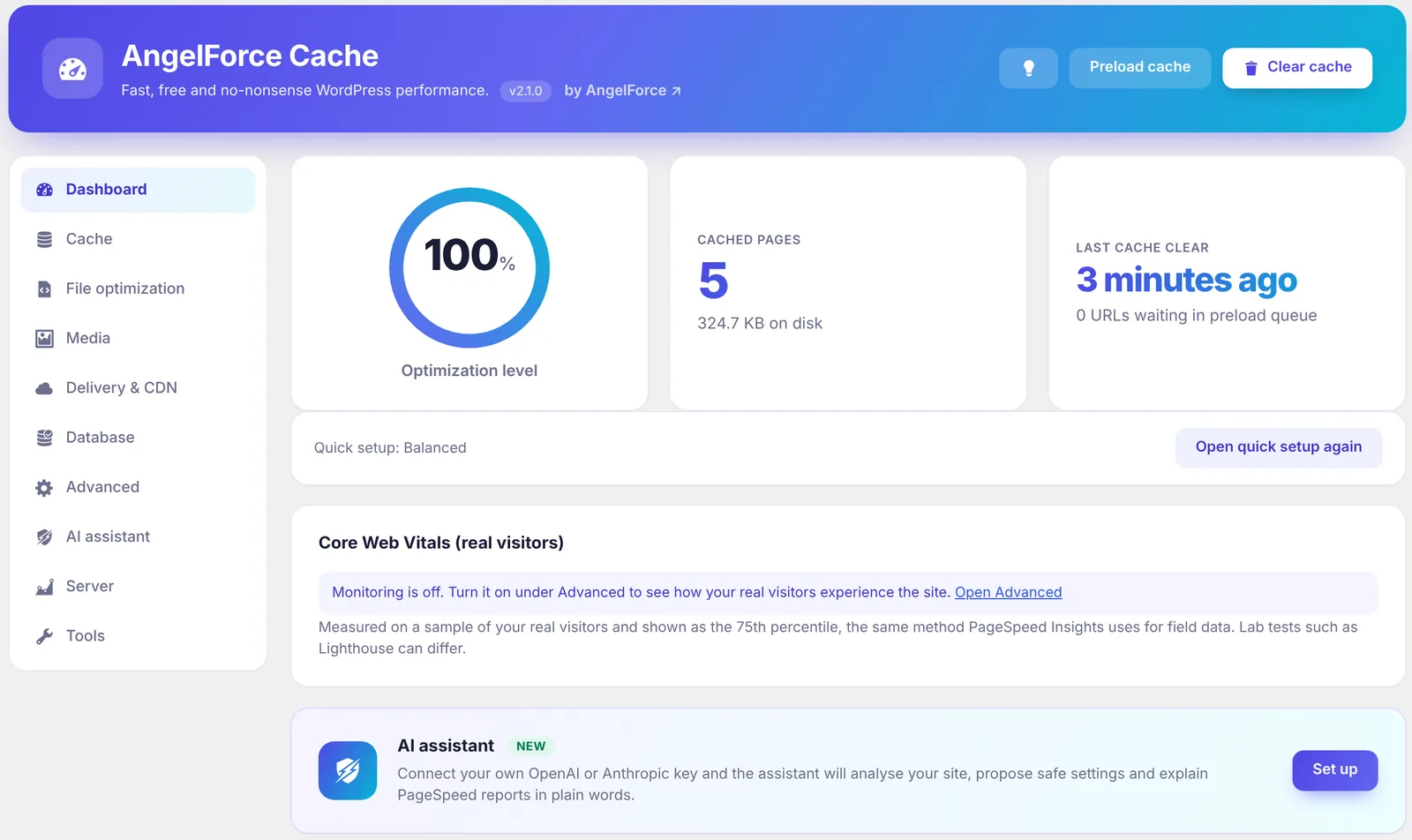
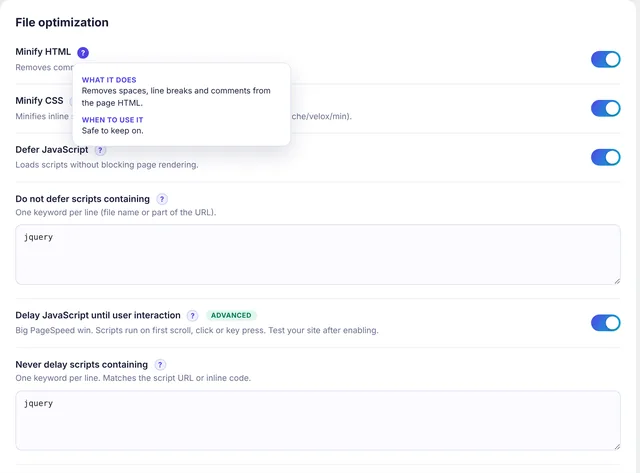
File optimisation: every switch has a ? that says what it does and when to use it. 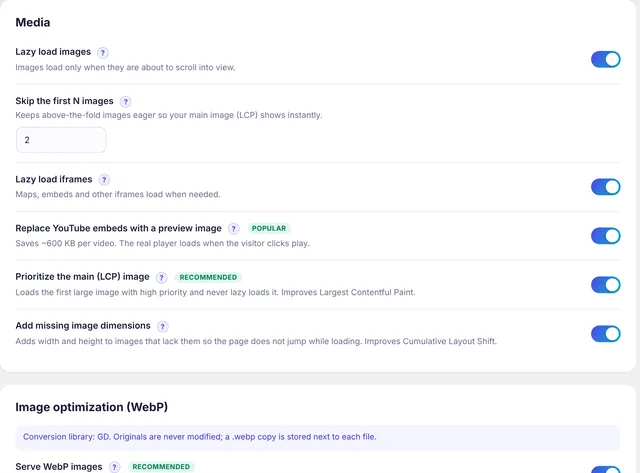
Media: lazy load, YouTube preview images, LCP priority and WebP. 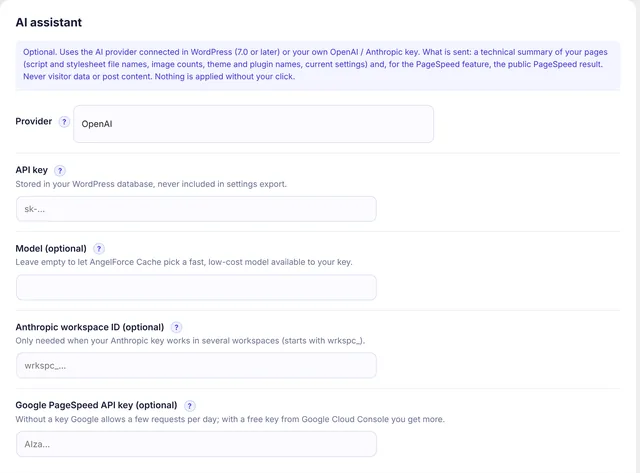
AI assistant: optional, with the AI connected in WordPress or your own key, and it says exactly what is sent.
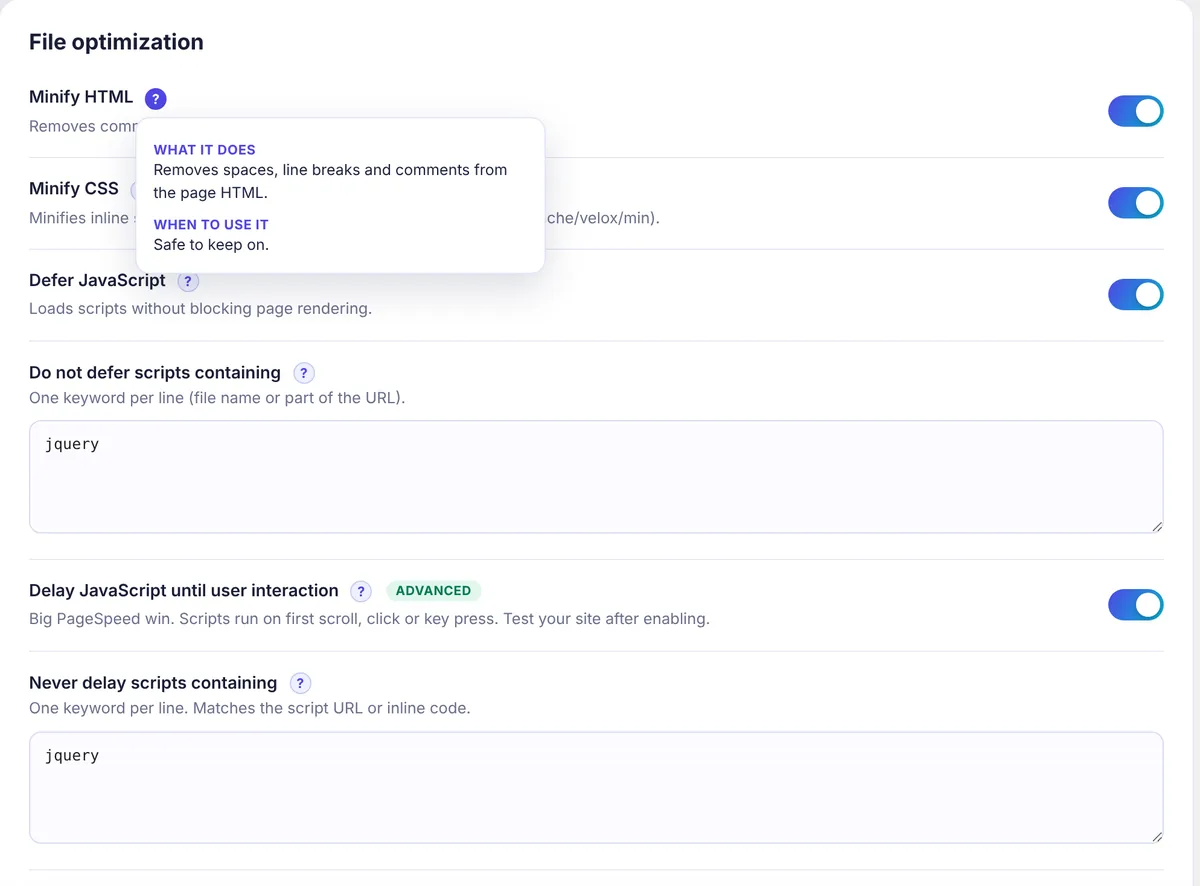
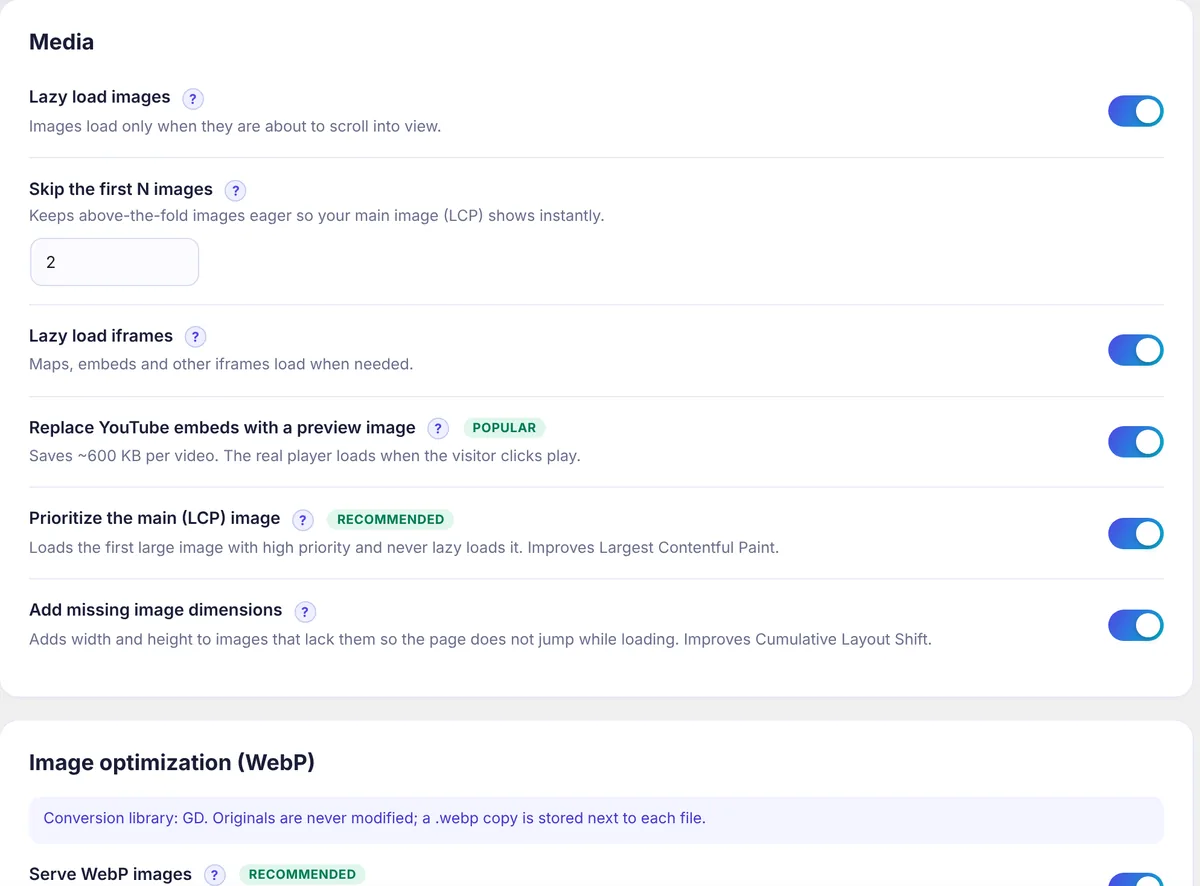
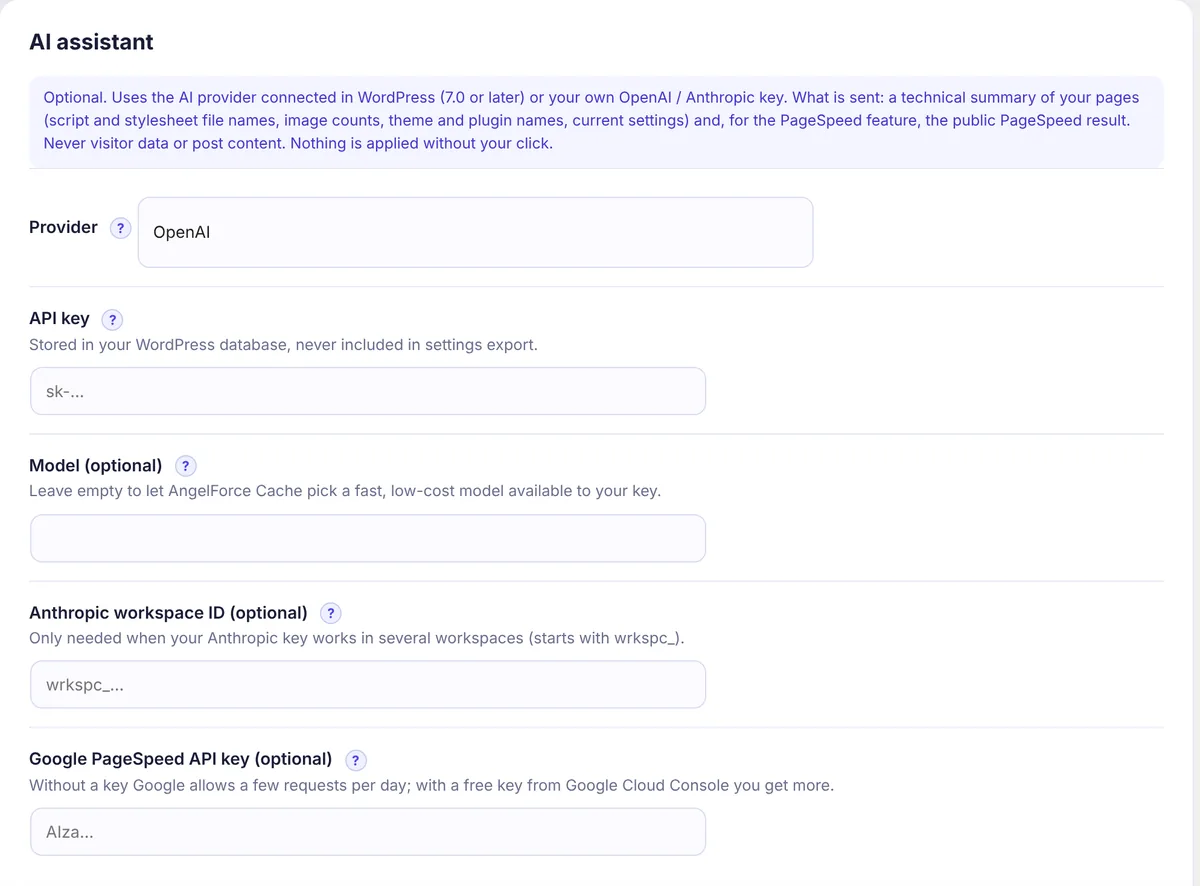
Screenshots from a test site. Select an image to see it at full size.
Measured, not promised
Four setups on the same server and the same page, measured on 20 October 2026. AngelForce Cache was the only one to score 100 in Google PageSpeed on both mobile and desktop, and it served about 3 times as many requests per second as W3 Total Cache and about 10 times as many as WP Super Cache. The tests used versions 1.9.1 and 1.9.4, released under the earlier name Velox Cache.
Server speed
AngelForce Cache serves cached pages straight from Apache without starting PHP, so it had the shortest time to first byte and the highest capacity.
| Setup | First byte, home page (ms) | First byte, post (ms) | Requests per second (20 concurrent) | Page, compressed (KB) |
|---|---|---|---|---|
| AngelForce Cache 1.9.1 | 0.6 | 0.6 | 5,621 | 23.4 |
| W3 Total Cache 2.10.7 | 1.3 | 1.3 | 2,015 | 20.4 |
| WP Super Cache 3.1.4 | 4.6 | 99.3 | 573 | 20.3 |
| No cache plugin | 104.9 | 86.7 | 17 | 20.2 |
WP Super Cache did not cache the post page with its default settings. The AngelForce Cache page is 3 KB larger because the critical CSS is part of the page, so the browser can draw it without waiting for the stylesheets. With an empty cache, the first visit adds 13–14 ms to the roughly 100 ms WordPress needs; every later visit takes 0.6 ms.
Google PageSpeed: mobile
AngelForce Cache showed the first content 0.6 s earlier and the main content 0.5–1.1 s earlier. The other two plugins did not change the mobile result compared with no plugin.
| Setup | Score | FCP (s) | LCP (s) | Speed Index (s) | CLS |
|---|---|---|---|---|---|
| AngelForce Cache 1.9.4 | 100 | 0.8 | 1.2–1.8 | 0.8–1.9 | 0 |
| W3 Total Cache 2.10.7 | 98 | 1.4 | 2.3 | 2.5 | 0 |
| WP Super Cache 3.1.4 | 98 | 1.4 | 2.3 | 1.4 | 0 |
| No cache plugin | 98 | 1.4 | 2.3 | 1.4 | 0 |
AngelForce Cache: the range of two runs; the others: one run. Emulated Moto G Power on slow 4G, Lighthouse 13.5.0. For WP Super Cache, PageSpeed returned the same run as for the test without a cache plugin (same timestamp: 20 October 2026, 19:53:40 UTC), so these figures are not a separate measurement.
Google PageSpeed: desktop
AngelForce Cache scored 100 on desktop as well, and the page looked complete about 2 seconds before the others (Speed Index 0.3 s).
| Setup | Score | FCP (s) | LCP (s) | Speed Index (s) | CLS |
|---|---|---|---|---|---|
| AngelForce Cache 1.9.4 | 100 | 0.2 | 0.8 | 0.3 | 0 |
| WP Super Cache 3.1.4 | 95 | 0.3 | 0.7 | 2.3 | 0 |
| No cache plugin | 95 | 0.3 | 0.7 | 2.3 | 0 |
| W3 Total Cache 2.10.7 | 94 | 0.3 | 0.6 | 2.5 | 0 |
For WP Super Cache, PageSpeed returned the same run as for the test without a cache plugin (same timestamp: 20 October 2026, 19:53:40 UTC), so these figures are not a separate measurement.
How we measured
- Server
- Hetzner Cloud, 4 GB RAM, Ubuntu 26.04, Apache 2.4.66 (mod_php), PHP 8.5.4, MariaDB 11.8
- Site
- WordPress 7.1.3, Astra 4.14.1, Elementor, Contact Form 7; 8 posts, each with a 1920 px cover image and a YouTube video
- Settings
- AngelForce Cache: Balanced profile (JavaScript delayed until the first interaction, critical CSS, lazy load). WP Super Cache: recommended simple mode. W3 Total Cache: page cache Disk: Enhanced. In each setup every other cache plugin was switched off.
- Server figures
- Measured from inside the server: the average of 20 curl requests for the first byte, and ApacheBench with 400 requests over 20 concurrent connections for requests per second. The cache was warmed first.
- PageSpeed
- pagespeed.web.dev, home page. The cache was cleared and warmed again between setups.
Limits of this test
- The test site is light, so every setup scored high. On heavy themes with many plugins the gap is expected to grow, but we did not measure that.
- PageSpeed lab results vary from run to run; each setup was run once or twice.
- WP Rocket was not tested because it needs a licence.
- The server figures were measured on the same machine; for a real visitor the network adds its own time.
Check the PageSpeed reports yourself
What it does
- Page cache without PHP
- Cached pages are served as static files by Apache or LiteSpeed, with a drop-in fallback. The cache is cleared automatically when posts, comments, menus, widgets or themes change, and refilled in the background from your XML sitemap.
- Faster pages
- HTML and CSS minify, critical CSS, removal of unused CSS, deferred JavaScript and JavaScript delayed until the first interaction. Payment, checkout, captcha, consent, form and slider scripts are never delayed.
- Images and media
- WebP and AVIF on upload and in bulk, lazy loading for images and iframes, a click-to-play YouTube preview, priority for the largest image and automatic image dimensions.
- Set up in a minute
- A setup wizard with Safe, Balanced and Maximum profiles, and a ? next to every setting that explains what it does, when to use it and what to watch out for.
- See what is happening
- The admin bar shows whether visitors get the current page from cache and, if not, why. Core Web Vitals from real visitors with a 30-day chart, and live CPU, memory, disk and OPcache gauges.
- Shops and CDNs
- WooCommerce ready: cart, checkout and account pages are never cached, and product pages refresh when stock or a sale changes. The Cloudflare cache is purged together with the plugin’s own cache.
AI assistant, only if you want it
The assistant uses the AI provider connected in WordPress 7.0 or later, or your own OpenAI or Anthropic key, and stays off until you set one up. It reads a technical summary of your site, proposes safe settings and fixes PageSpeed findings for mobile and desktop.
- Step-by-step mode applies the safest change first, checks the home page and the latest post after every step, and undoes a step that breaks text, images or forms.
- One click restores the settings from before the AI touched them.
- Writes alt text for images that have none.
- Site data is passed to the model as untrusted input, and its answers are checked against a whitelist before anything is shown or applied.
Built by a security company
What leaves your site
Only when you click "Analyse site" or "Run PageSpeed": a technical summary (file names, image counts, theme and plugin names, your AngelForce Cache settings) goes to the AI provider you chose. Visitor data, cookies and post content are never sent.
Signed model list
Default AI model names are read from a small public file on angelforce.eu, at most once a day and only when the assistant is used. The plugin accepts it only with a valid AngelForce Ed25519 signature and only if it names small, low-cost models.
Hardened and audited
Every admin action needs administrator rights and a security token. The only public endpoint, the Core Web Vitals beacon, takes five numbers, is size- and rate-limited. Version 2.0 shipped after an independent security audit.
Found a security problem in AngelForce Cache? Please tell us first, through our security.txt.
Download and install
- Download the ZIP file. Do not unpack it.
- In WordPress, go to Plugins → Add New Plugin → Upload Plugin, choose the file and click Install Now.
- Activate the plugin, open AngelForce Cache in the menu and answer the two quick setup questions.
- File
- angelforce-cache-2.1.0.zip
- Version
- 2.1.0
- Size
- 134 KB
SHA-256 checksume841daa4af76c71269fde21f8fb07f5686812a319e69778c2c50f9a771f13b0f
Compare it with your download, for example with sha256sum on Linux and macOS or Get-FileHash in PowerShell.
Requirements
- WordPress
- 5.8 or later, tested up to 7.1
- PHP
- 7.4 or later
- Web server
- Apache or LiteSpeed for static serving; on Nginx the PHP features work and the GZIP and caching rules are added by hand
- Languages
- English; other languages through translate.wordpress.org once the plugin is in the directory
- Price and licence
- Free, GPLv2 or later
- Latest version
- 2.1.0
Questions
How does AngelForce Cache compare with WP Rocket, LiteSpeed Cache or W3 Total Cache?
We measured W3 Total Cache and WP Super Cache on the same server; the results are above. WP Rocket needs a licence and was not tested, and the page cache of LiteSpeed Cache needs a LiteSpeed web server. AngelForce Cache is free, serves cached pages on Apache and LiteSpeed without starting PHP, and includes critical CSS, delayed JavaScript and WebP/AVIF, which otherwise often take a second plugin.
Is AngelForce Cache the same plugin as Velox Cache?
Yes. Velox Cache was renamed AngelForce Cache in version 2.1.0. Install AngelForce Cache, then deactivate and delete the old Velox Cache: your settings, cache and real-visitor data are kept. While the old copy is still active, the new one waits and shows a notice.
Does it work on Nginx?
Yes. Page cache, minify, lazy load and the other PHP features work. The GZIP and browser caching rules have to be added to your Nginx configuration by hand.
I already use another cache plugin.
Use only one page-cache plugin at a time. AngelForce Cache will not overwrite another plugin’s advanced-cache.php.
Can other plugins work with it?
Yes. AngelForce Cache has a PHP API for plugins on the same site, for example to purge a page or read the cache status. Nothing is sent off the site.
A page looks wrong after optimisation. What now?
While logged in as an administrator, add ?velox_off=1 to the address to see the page without optimisation, then switch off the setting that causes it or choose a safer profile.
Want AngelForce Cache on your site?
Download it for free, or ask us for help making a slow WordPress site fast.